中文 · English
Logo Nest Studio
SVG nesting and sheet layout tool. Take one logo, set its real-world size, and pack as many copies as possible onto a single sheet. Export vector files ready for printing, die-cutting, or laser cutting. Free, open source, runs entirely on your own machine.
No installer — unzip and run. Nothing is uploaded anywhere. MIT licensed, free for commercial use.
How it works
- Get an SVG file. Illustrator, CorelDRAW, Figma, and Inkscape all export one.
- Drag it into the window, or press
Ctrl+O. - Enter three numbers: how big the logo should print, the minimum gap between two logos, and the sheet margin. Then pick a sheet size.
- Click "Start", wait a few seconds, then export SVG or PDF and send it to print.
Before nesting anything, the preview already draws a single logo on the sheet at true scale, so you can see whether the size is right without doing the arithmetic first. At 100% zoom, what's on screen is the size it will print.
What it's for
Anything where one shape gets repeated across a sheet of material:
- Stickers, labels, decals — fit the most pieces per sheet, saving both material and die-cutting passes.
- Print imposition — gang up a small artwork into a full sheet, packed tighter than copy-pasting by hand.
- Laser cutting and CNC — work out the most material-efficient layout before cutting a batch of identical parts.
- Foil stamping, screen printing, vinyl cutting, acrylic — same idea throughout.
Features
- Any shape. Circles, squares, triangles, stars, shapes with holes, shapes with text. Irregular outlines are where this tool earns its keep — it tries rotations and interlocking arrangements to find the tightest packing.
- Any sheet. A0–A6, B4, B5, Letter, Legal, Tabloid, portrait or landscape, or your own dimensions.
- The minimum gap is a hard constraint. After nesting, an independent pass re-checks every piece for spacing violations and sheet overruns.
- Three export formats. Vector SVG (still editable), vector PDF (print-ready), 300 DPI PNG.
- Files stay small. An SVG with 25 nested logos is about the size of the single logo, because copies are references rather than duplicated geometry.
Results
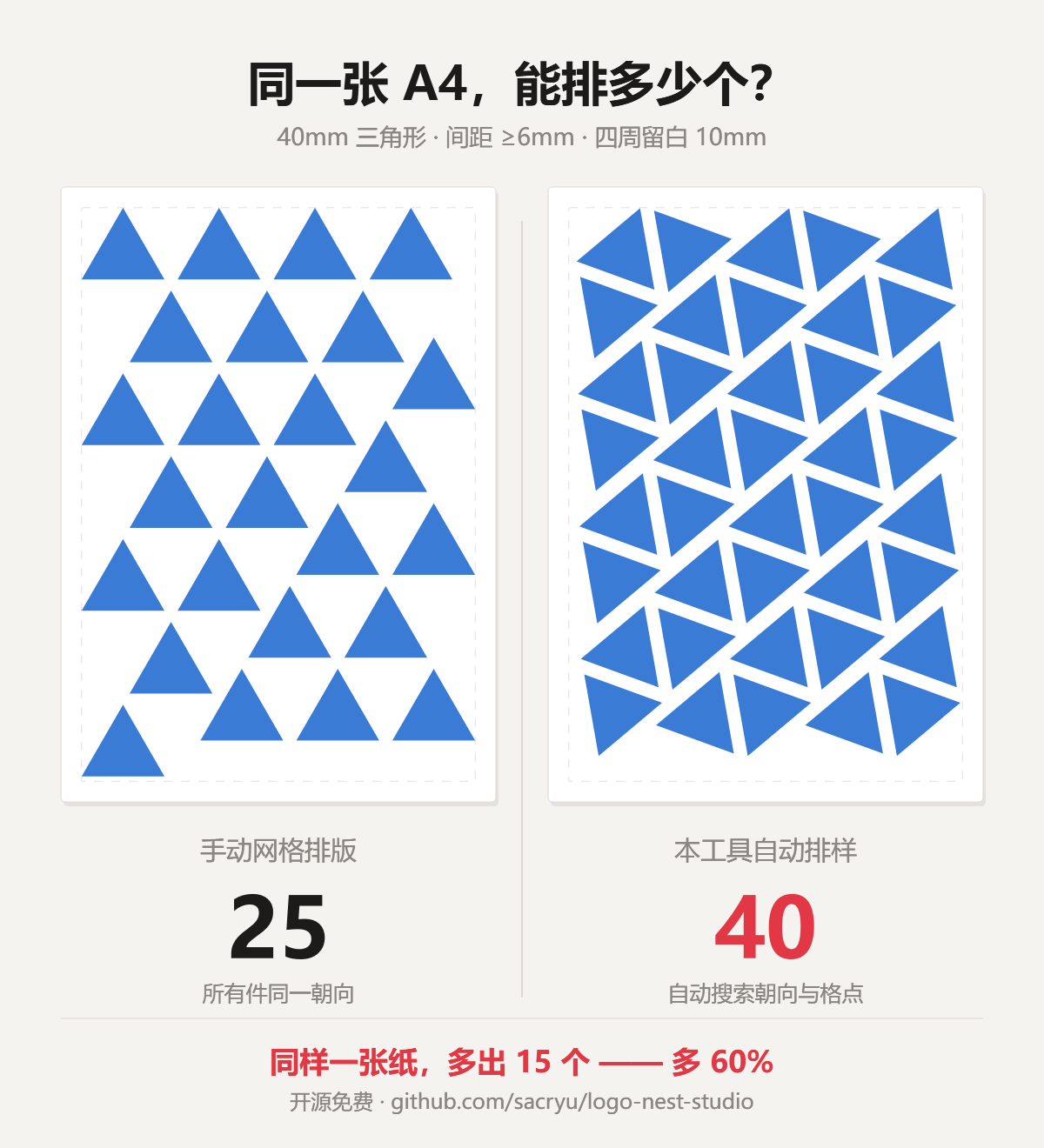
A4 sheet, 40 mm logo, 6 mm minimum gap, 10 mm margin:
| Shape | Auto-nested | Same orientation | Gain |
|---|---|---|---|
| Circle | 25 | 24 | +4% |
| Ellipse | 48 | 42 | +14% |
| Equilateral triangle | 40 | 25 | +60% |
| Five-pointed star | 33 | 32 | +3% |
| Teardrop | 30 | 27 | +11% |
| L-shape | 25 | 24 | +4% |
"Same orientation" is the best result with every piece unrotated — essentially what you'd get copy-pasting in a design application.
To be honest about it: the rounder the shape, the less there is to gain. A circle
has no meaningful rotation to exploit, so it gains one piece. The real wins come from directional
shapes like triangles and teardrops, where flipping half the pieces 180° and interlocking them frees
up a lot of space. You can verify these numbers yourself by running
python tools/benchmark.py, which recomputes the table and validates every placement.
FAQ
How is this different from SVGnest / Deepnest?
Those are general-purpose nesting tools that pack many different shapes together, aimed mainly at laser cutting and CNC. This tool does one thing: batch layout of a single repeated shape. Because the problem is narrower, it can use a different approach — grid search over NFP + FFT convolution rather than a genetic algorithm — so it returns in seconds and independently re-verifies every piece's spacing and bounds afterward. Mixing different parts? Use Deepnest. Filling a sheet with one logo? Use this.
Does it work on macOS / Linux?
No packaged build yet, but the program itself is cross-platform. With Python 3.10+, run
pip install -r requirements.txt then python gui.py.
My file is AI / CDR / PSD / PDF, not SVG.
Export or "Save As" SVG from the original application. CorelDRAW, Illustrator, Photoshop (shape layers), Figma, and Inkscape all support it.
Are the gaps accurate?
They are guaranteed never smaller than what you set. Because placement is computed on a raster grid, actual gaps may run about 0.2 mm larger than specified, never tighter. You can raise the precision parameter in the source for a tighter bound, at roughly 4× the runtime.
Can it nest several different logos at once?
No. This tool handles one shape at a time. Mixed-part nesting is a different class of algorithm.
My antivirus flags it.
False positives on PyInstaller-packaged programs are common. If it bothers you, read the source and build it yourself.